


Link-in-bio pages
Pick a theme, add your links and show your Instagram grid. The page lives at yourname.so-me.studio, and insights count its views, link clicks and click-through rate.
Write a post once, adjust it for each account and pick a time. It goes out on schedule, and your calendar shows the whole week at a glance.
The demo runs on sample data. Look around without signing up.
Publish to
Write one post for all your accounts. Then give any account its own caption, media or posting time, and its own first comment where the network supports one.
Pick your accounts, write one caption and add one set of media. Change one account and the rest keep the shared draft.
Check each version in a preview styled like the network's own post before you schedule it.
Generate a caption, or select text and rewrite it: add a hook, add detail or type your own instruction.
AI writing uses monthly AI credits, included from the Creator plan up.
Add PDFs, images, notes and text files to the Knowledge Hub. AI drafts can draw on them, so captions start from your own facts.
Our autumn collection lands Friday 🍂 24 handmade pieces. Which one is yours? #handmade
Our autumn collection lands this Friday 🍂 24 handmade pieces, shaped and glazed in our little studio. Which one would you take home?
#smallbusiness #handmade
Prices and sizes for every piece are on our website.
clayandco Our autumn collection lands this Friday 🍂 24 handmade pieces, shaped and glazed in our little studio. Which one would you take home?
#ceramics #handmade #autumn #shopsmall
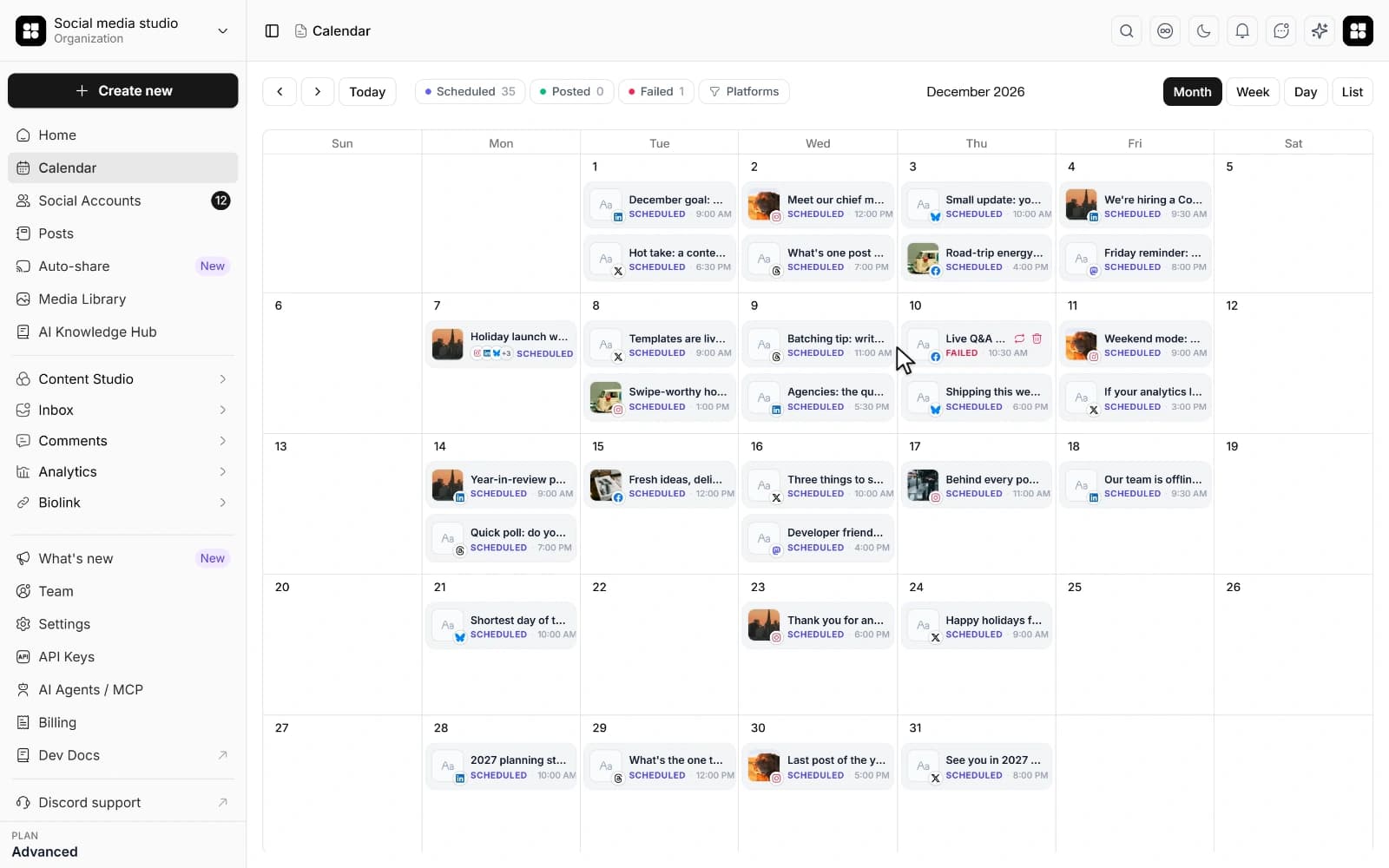
Every post you schedule lands on one calendar. Switch between month, week, day and list, and drag a post to another day when plans change.
Month for the big picture, week and day for the detail, list for a quick check. Posts for all your accounts share one calendar, and you can filter it by platform.
Pick up a scheduled post and drop it on another day. It keeps its time of day, and in the week view you can drop it on a new hour too. The change saves at once.
Set a post to repeat daily, weekly or monthly, and its runs show on the calendar. When you schedule, the composer suggests times you can pick with one click.
Instagram suggestions use your account's own engagement once it has enough posts. Other networks use common posting times.
Comments, mentions and DMs land in one list you can filter by network. Answer with an AI draft or a saved reply, or send one reply to many DMs that ask the same thing.
Networks in the inbox
 Facebook
 Instagram
 WhatsApp
 X
 YouTube
 Threads*
 LinkedIn Pages*
 Bluesky
 Mastodon
 Telegram
 Discord
 Slack
* Comment access on these networks depends on approval from the network.
Ask AI to draft a reply from the conversation, then edit it before you send.
Save answers to the questions you get every day, then drop one into a reply by typing /.
Select DMs that ask the same thing, see who will get the reply, then send one message to all of them with each person's name filled in.
Reply automatically when a comment contains a keyword, and run giveaways with a recorded draw on posts you publish from the app.
The inbox and comment automation come with the Creator plan and up. AI drafts use your plan's AI credits.
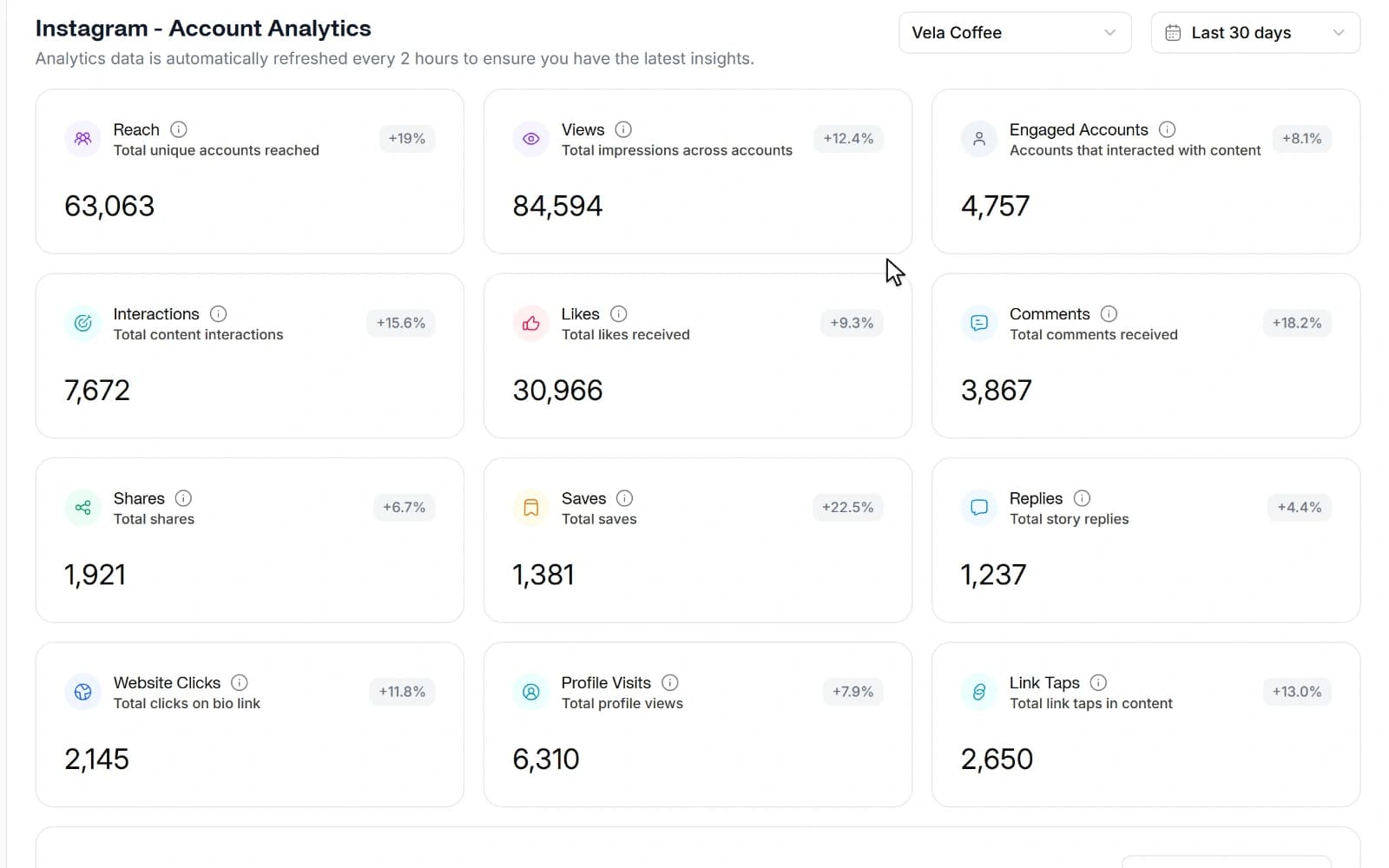
Each analytics page covers one network, with account totals and stats for your posts, so you can do more of what works. Your link-in-bio pages count views and clicks too.
Sample Instagram analytics page with four account totals, a 30-day chart, interactions by type and top posts. The numbers are made up.
A sample workspace with made-up numbers. In the app you see your own accounts.
Account totals and post stats in each network's own metrics. Available for:
Open a published post on the Posts page to see its numbers and how they changed since the last check. This works for posts on the networks above.
See views, clicks and click-through rate for each of your link-in-bio pages.
Analytics and link-in-bio pages come with the Creator plan and up.
Link-in-bio pages, a shared media library, approvals, AI repurposing, brand knowledge and a workspace for every brand, all in the app you already schedule from.
Pick a theme, add your links and show your Instagram grid. The page lives at yourname.so-me.studio, and insights count its views, link clicks and click-through rate.
Keep images and videos in folders your whole team can use. Upload from your device, a link, Dropbox or Unsplash, then crop, rotate or add text in the built-in image editor.
Choose which teammates need approval. Their posts wait for an owner, who approves them or sends them back with a comment. A pending post never publishes.
Paste one post and get a batch of AI variations for your accounts. Spread them across the calendar or keep them on an evergreen loop.
Add PDFs, images and notes about your brand and products. AI captions use them as context, so first drafts start from your own facts and tone.
Give each brand or client a workspace of its own, with separate social accounts, team, media and calendar. Each workspace has its own plan.
Link-in-bio pages, team approvals, Repurpose and AI captions start on the Creator plan. Compare plans
Every plan starts with a 7-day free trial. Cancel anytime.
Prices are per workspace. Each plan covers one workspace, and every other workspace you create needs its own plan.
For large teams & enterprises
Billed monthly
For growing teams & agencies
Billed monthly
For individual creators & freelancers
Billed monthly
Post to every platform, by hand or through the API and MCP
Billed monthly
Start with a 7-day free trial. A credit card is required, but nothing is charged until the trial ends. Your selected plan renews automatically after 7 days unless you cancel in Billing. There is no free plan.
You can schedule and publish posts to Instagram, Facebook, X, LinkedIn, TikTok, YouTube, Threads, Pinterest, Bluesky, Mastodon, WordPress, Dev.to, Dribbble, Discord and Slack. On LinkedIn you can post to personal profiles and company Pages, and on Instagram to the feed, Reels and Stories. WhatsApp and Telegram connect to the inbox for messages rather than scheduled posts. Your plan sets how many social accounts each workspace can connect.
Write a post once in the composer and choose the accounts it goes to. Each account can get its own caption, media, first comment and time, with live previews for the main networks. When you pick a time, the composer suggests slots: on Instagram they come from your own engagement, and on other networks from standard time windows. Scheduled posts sit on a calendar with month, week, day and list views, and you drag a post to move it. A post can also repeat daily, weekly or monthly, and each repeat counts toward your plan's monthly posts.
Yes, on plans with team members, from Creator up. Each member is set either to need approval or to post directly. When a member who needs approval schedules a post, it waits until a workspace owner approves it or rejects it with comments, and a post waiting for approval never publishes. Owners' own posts skip the queue. Approval covers posts made in the dashboard. Posts an AI agent creates are scheduled directly, so ask your agent to save drafts if you want to check them first.
Yes, both come with Creator and higher plans. The inbox gathers comments and messages from Instagram, Facebook, WhatsApp, X, YouTube, Bluesky, Mastodon, Discord, Slack and Telegram in one place, with saved replies, AI reply suggestions and bulk replies you preview before they go out. Analytics has a page for each of Instagram, Facebook, X, LinkedIn, YouTube, Pinterest, Bluesky and Mastodon, and your home dashboard shows the totals. The Lite plan includes neither.
Yes. AI writing is built into the composer: describe the post, pick one of 11 tones, and it drafts or rewrites the caption and suggests hashtags within each network's length limit. It can use the brand notes you keep in the Knowledge Hub. AI credits come with Creator and higher plans and reset every billing cycle. Workspace owners can switch AI features off in Settings.
Yes. Give each brand or client its own workspace. A workspace keeps its own social accounts, team, posts, AI credits and brand details, so nothing mixes between clients. Pricing is per workspace: each one has its own subscription, which you choose from its billing page.
Yes. The live demo is a working copy of the app filled with sample data, and it needs no account. Look around the calendar, composer, inbox and analytics. When you try to schedule a post, send a reply or connect an account, it asks you to sign up.
Yes. Every plan starts with a 7-day free trial. A credit card is required, but nothing is charged until the trial ends. Your plan renews automatically after 7 days unless you cancel in Billing.
Yes. Cancel any time from your billing settings, and you keep access until the end of the current billing period. New monthly and annual subscriptions have a 30-day money-back guarantee on the first subscription payment. The guarantee does not cover renewals or upgrades after the initial 30 days. Contact support to request a refund; cancelling alone does not request one.
Claude, ChatGPT, Dots, Muse and other AI agents can schedule posts, answer comments and report results in the same workspace you use. You keep the calendar: what they schedule shows up there, and you can move or edit it like any other post.
Ask in plain words, and your agent writes the posts and schedules them on the networks you pick.
It reads new comments and messages in your inbox and answers them.
It reads your analytics and tells you which posts worked.
Every plan lets you connect an agent. Replies and reports need Creator or a higher plan.
Your network logins never reach the agent, and you can disconnect it or revoke its key in Settings at any time.
Sample week: agents add posts to your calendar, and you can still drag any of them to another day.
Stop juggling tabs, draft, customize, and publish to 20 platforms from a single calendar.
